
MCheck Documentation
MCheck is the Complete Self-Hosted Email Verification Tool, built on PHP/Laravel. It helps marketers and developers clean contact lists, reduce bounce rates, and improve deliverability with powerful bulk and real-time API checks.
Introduction
Welcome to the MCheck documentation. This platform allows you to perform detailed email address verification in bulk via CSV file upload or in real-time using a powerful integrated REST API.
As a self-hosted solution, MCheck gives you full control over your data and costs, with no recurring fees or verification limits.
Core Checks & Features
Everything needed to clean and validate email lists: SMTP, MX, syntax, catch-all, disposable, role detection and more.
SMTP Check
Verify the existence of the mailbox by probing the SMTP server.
MX Record Detection
Confirm the domain has mail exchange records configured.
Catch-All Detection
Detect domains that accept all emails (higher risk for undeliverables).
Disposable / Temporary Detection
Identify throwaway provider addresses used for single-use signups.
Role-Based Detection
Flag role addresses like info@, support@ often unsuitable for personal outreach.
Email Quality Score
Each address receives a score representing deliverability probability.
Installation
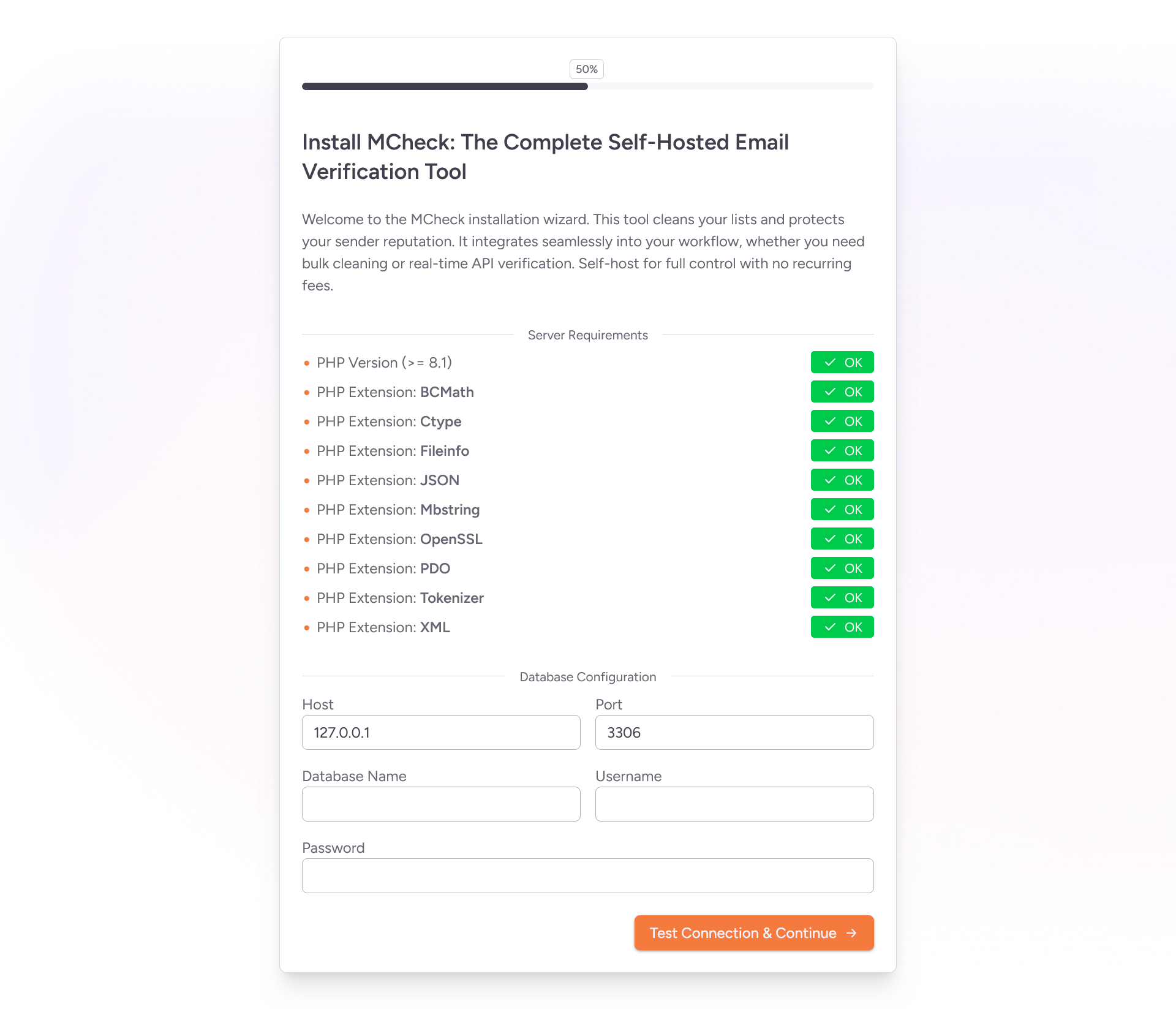
MCheck offers two installation methods: the visual installer for a quick and easy setup, or the technical method via Git and Composer for developers.
1. Visual Installation (Recommended)
The installation wizard will guide you through server requirement checks, database configuration, and admin account creation.
- Download the source code from your purchase receipt.
- Upload the contents of the `mcheck.zip` file to your web server's public directory (e.g., `public_html`).
- Navigate to `your-domain.com/install` in your web browser.
- Follow the on-screen instructions to complete the setup.
2. Technical Installation (Git & Composer)
This method is for developers comfortable with the command line and Git.
- Clone the repository from the private GitHub link provided:
git clone YOUR_PRIVATE_REPO_URL - Navigate into the project directory:
cd mcheck - Install PHP dependencies:
composer install --no-dev - Copy the environment file:
cp .env.example .env - Configure your database and application settings in the `.env` file.
- Generate an application key:
php artisan key:generate - Run the database migrations:
php artisan migrate --force - Generate Vite BUILD:
npm install && npm run build
⚙️ Background Automation
Bulk list processing is handled asynchronously using Laravel Queues to ensure optimal performance and prevent web server timeouts. To ensure that verification and list processing starts immediately after upload, you must configure a Cron Job to execute the queue worker.
Cron Job Setup
Add the following line to your crontab to execute the queue listener every minute. This ensures that background tasks are processed continuously.
* * * * * cd /path/to/mcheck/root && php artisan queue:work --timeout=3600 --sleep=3 --tries=3 > /dev/null 2>&1Important:
Be sure to replace
/path/to/mcheck/rootwith the absolute path to your MCheck installation directory on the server.
🌐 REST API Reference
MCheck's REST API enables real-time email verification. All endpoints are prefixed with /api.
Authentication
The API uses `X-Api-Key` header authentication. You can create and manage your API keys in the admin dashboard under the "API Settings" section. Include your API key in the `X-Api-Key` header of your requests.
X-Api-Key: XXXXXXXXXXXXXXXXXXXX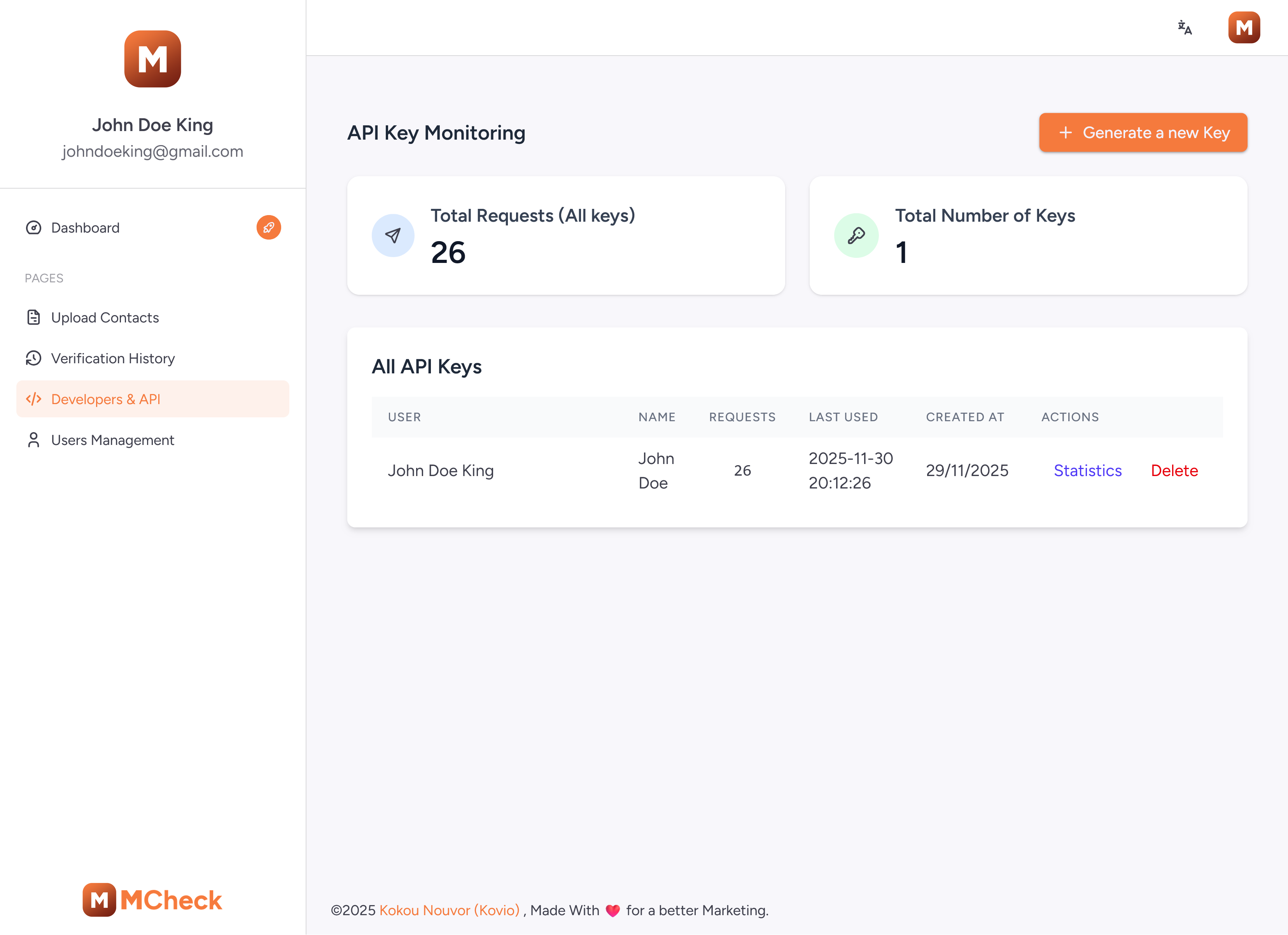
Verify a Single Email
To verify a single email address, make a `POST` request to the `/api/verify` endpoint with the email as a query parameter.
Endpoint
POST /api/verifyParameters
| Parameter | Type | Description |
|---|---|---|
| `email` | string (required) | The email address to verify. (e.g., `test@example.com`) |
Example Request (cURL)
curl -X POST "https://your-domain.com/api/verify?email=test@example.com" \
  -H "X-Api-Key: YOUR_API_KEY" \
  -H "Accept: application/json"
API Responses & Fields
The API returns a structured JSON object with the verification results.
Successful Response (200 OK):
{
  "is_valid": true,
  "email": "test@example.com",
  "quality_score": 95,
  "suggestion": null,
  "validations": {
    "syntax": true,
    "mx_records": true,
    "smtp": true,
    "disposable": false,
    "role": false,
    "catch_all": false
  }
}
Response Field Descriptions
- is_valid: (`boolean`) `true` if the email is considered deliverable.
- email: (`string`) The email address that was verified.
- quality_score: (`integer`) A score from 0 to 100 representing the deliverability confidence.
- suggestion: (`string|null`) A suggested correction for a potentially misspelled domain, or `null`.
- validations: (`object`) A breakdown of individual checks:
- `syntax`: Is the email format valid?
- `mx_records`: Does the domain have valid MX records?
- `smtp`: Was the SMTP server reachable?
- `disposable`: Is it from a disposable email provider?
- `role`: Is it a role-based address (e.g., `info@`)?
- `catch_all`: Does the server accept all emails?
✨ Key Features
MCheck is packed with features to ensure your email lists are clean and your campaigns are effective.
Bulk Verification
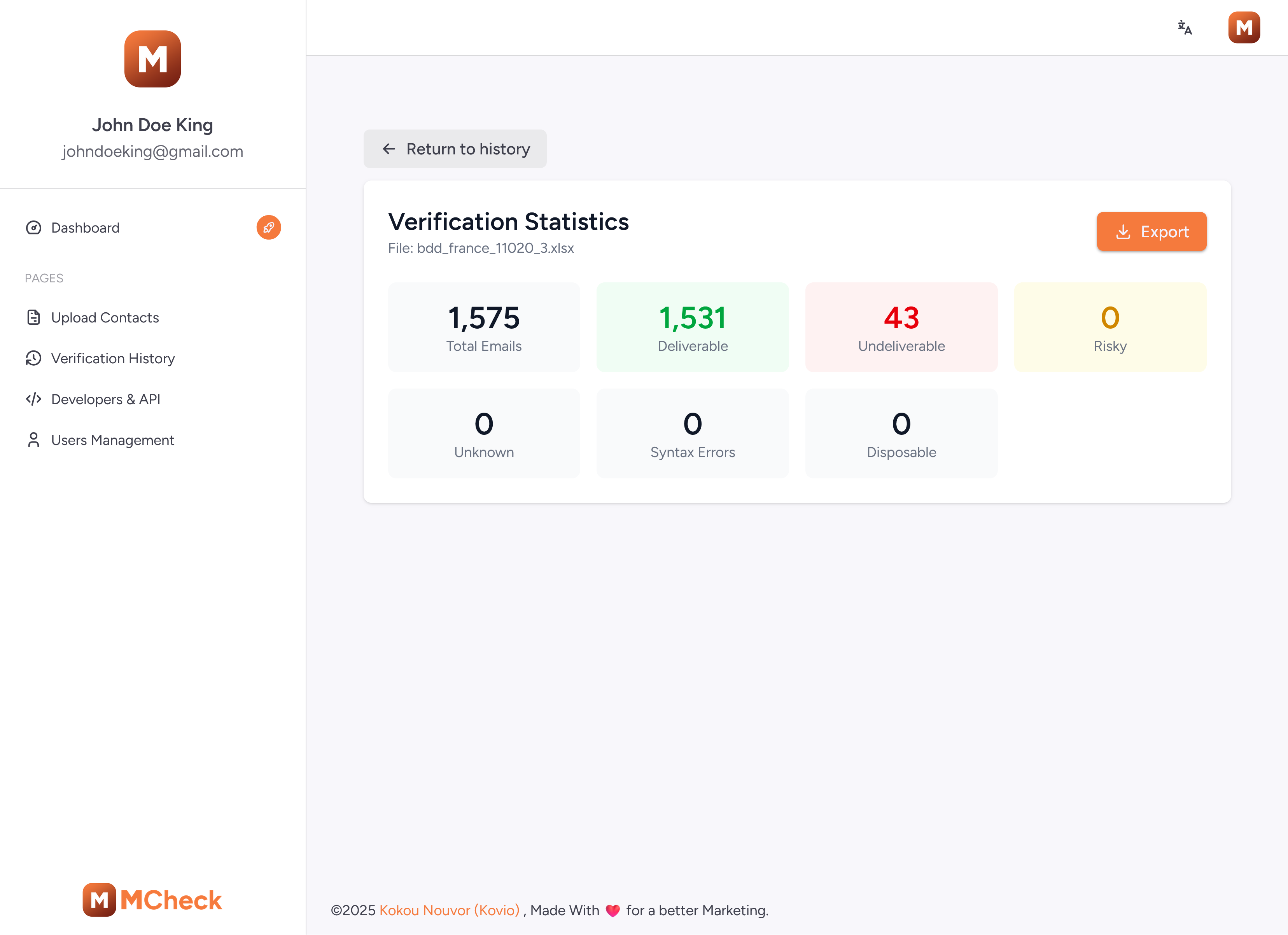
The dashboard allows you to upload a CSV file containing a list of emails. The system will process the list in the background, providing real-time progress updates. Key features include:
- CSV Upload: Easily upload your contact lists.
- Progressive Results: View results as they come in, no need to wait for the entire list to finish.
- Deduplication: Automatically removes duplicate emails from your list before processing to save time.
- Downloadable Reports: Export the cleaned list, including all verification details and quality scores.
Admin Dashboard
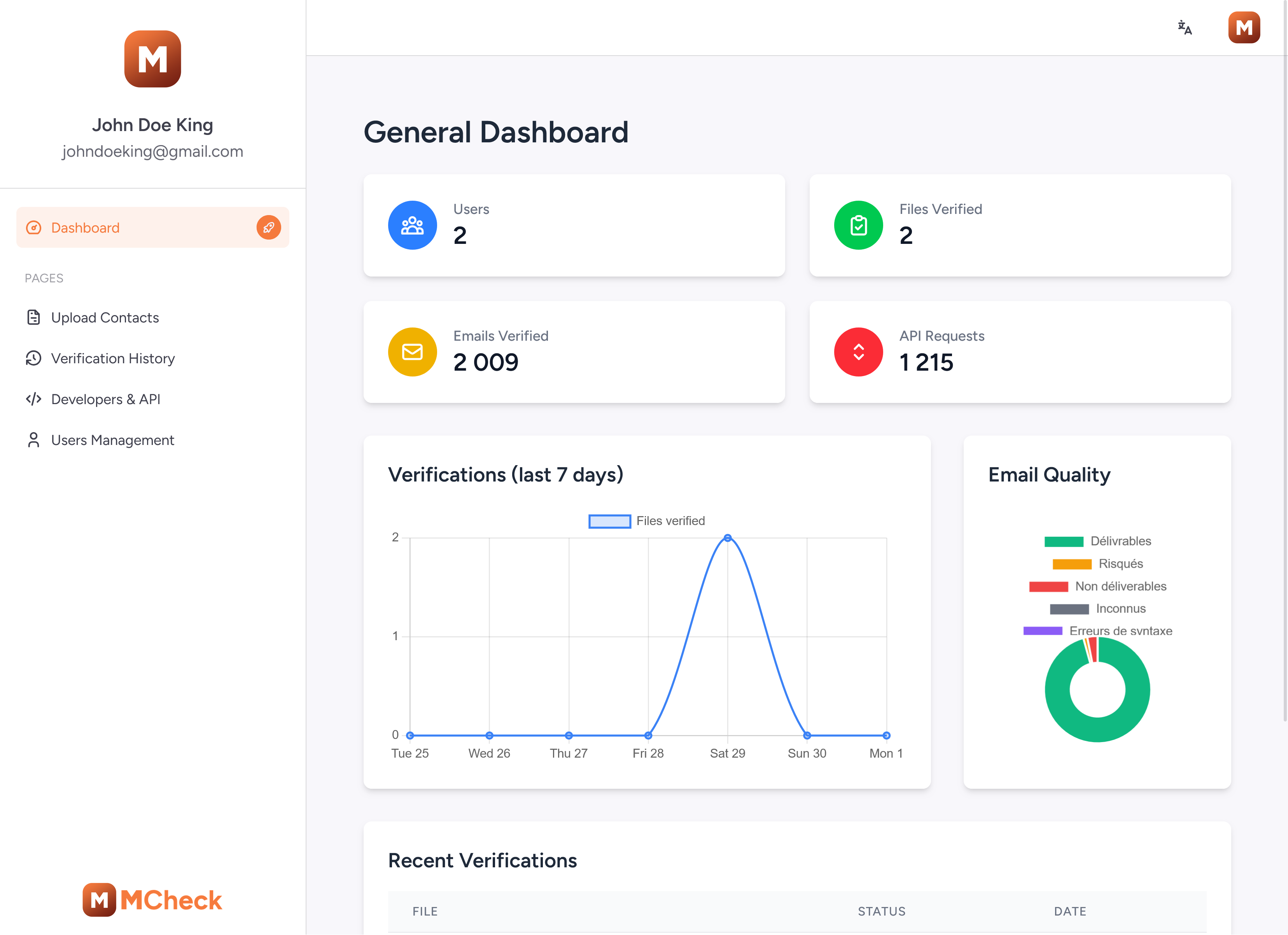
The intuitive dashboard gives you a complete overview of your verification activities.
- Usage Statistics: Monitor the number of verifications, success rates, and invalid emails over time.
- API Management: Generate, revoke, and manage your API keys.
- Detailed Logs: Access a full history of all API and bulk verification jobs.
Frequently Asked Questions
Common questions about the API, self-hosting, and pricing.
What does "lifetime license" mean?
You pay once and own the software forever. You'll receive all future updates and have access to support without any recurring fees.
Can I verify large lists?
Yes, our tool is designed for bulk processing. You can upload large CSV files and get progressive results, including deduplication.
Is the API included?
Yes, the software includes a full-featured REST API that you can use for real-time verification. You can monitor its usage from the admin dashboard.